
The AI landscape has changed dramatically. In January 2025, DeepSeek R1 stormed onto the scene — an open-weights reasoning model that achieved GPT-4-class performance while being completely self-hostable. It sent shockwaves through the industry, briefly wiping almost $1 trillion from Nvidia's market cap and forcing every tech team to ask a simple question: why are we still paying for cloud AI?
A year later, the answer is even clearer. DeepSeek R1 and its distilled variants run beautifully on commodity hardware via Ollama. ChatGPT remains a polished cloud product — but at recurring cost, with your data flowing through OpenAI's servers.
In this comprehensive comparison, we'll analyze cost, privacy, performance, and use cases to help you decide which path is right for your team in 2026.
TL;DR — The Quick Comparison
| Feature | DeepSeek R1 (Self-Hosted) | ChatGPT (OpenAI Cloud) |
|---|---|---|
| Hosting | Your hardware / VPS | OpenAI servers |
| Cost Model | One-time hardware + electricity | $20–200/month per user (subscription) or pay-per-token API |
| Data Privacy | 100% local — nothing leaves your network | Data processed on OpenAI servers |
| Model Access | Open weights (MIT license) | Proprietary, closed source |
| Offline Usage | ✅ Full functionality offline | ❌ Requires internet |
| Customization | Fine-tuning, quantization, freely modifiable | Limited to system prompts and GPTs |
| Reasoning Quality | Comparable to GPT-4o on math and code benchmarks | State-of-the-art with GPT-4o / o1 |
| Setup Ease | ~10 minutes with Ollama | Sign up and go |
| Model Sizes | 1.5B to 671B parameters | N/A (cloud only) |
| Rate Limits | None — limited only by your hardware | Tiered API rate limits |
Why DeepSeek R1 Changed Everything
The Open-Weights Revolution
DeepSeek R1 wasn't just another open-source model. It was proof that a Chinese AI lab could produce reasoning capabilities that rivaled the best from OpenAI — and then release the weights for free. The model family ranges from a tiny 1.5B distilled version (runs on a Raspberry Pi) to the full 671B parameter Mixture-of-Experts behemoth.
Key benchmark results that caught attention:
- AIME 2024 (Math): DeepSeek R1 scored 79.8%, comparable to OpenAI's o1-mini
- Codeforces (Competitive Programming): Elo rating of 2,029 — rivaling top human competitors
- MATH-500: 97.3% accuracy, outperforming GPT-4o
- GPQA Diamond (Graduate-level science): 71.5%, competitive with o1-preview
The message was unmistakable: you no longer need a $200/month API bill to access frontier-level reasoning.
Why It Matters Now
In 2026, the DeepSeek ecosystem has matured significantly:
- Ollama provides one-command deployment for all DeepSeek R1 variants
- Quantized models (Q4_K_M, Q8) let the 70B distillate run smoothly on a MacBook Pro with 64GB RAM
- Open WebUI gives you a ChatGPT-like interface over your local model
- Community fine-tunes exist for every domain from legal to medical to code review
The infrastructure is production-ready. The question isn't can you self-host — it's why wouldn't you?
Cost Comparison: The Numbers Don't Lie
ChatGPT Pricing in 2026
OpenAI's pricing structure has evolved, but the core model remains: you pay per user, per month, forever.
| Plan | Price | What You Get |
|---|---|---|
| Free | $0 | Limited GPT-4o access, rate limited |
| Plus | $20/month | More GPT-4o, o1 access, DALL-E, browsing |
| Pro | $200/month | Unlimited access to all models, o1 Pro mode |
| Team | $25–30/user/month | Workspace features, admin controls |
| Enterprise | Custom | SSO, compliance, dedicated support |
API Pricing (pay-per-token):
- GPT-4o: ~$2.50/1M input tokens, ~$10/1M output tokens
- o1: ~$15/1M input tokens, ~$60/1M output tokens
For a team of 10 developers using ChatGPT Plus, that's $2,400/year minimum. Heavy API usage can easily push costs to $10,000–50,000/year.
Self-Hosted DeepSeek R1 Costs
The beauty of self-hosting: costs are fixed and predictable.
| Setup | Hardware Cost | Monthly Cost | Performance Tier |
|---|---|---|---|
| MacBook Pro M4 Max (128GB) | ~$4,000 (already have?) | ~$5 electricity | Runs 70B distillate comfortably |
| Desktop with RTX 4090 (24GB) | ~$2,000 GPU | ~$10 electricity | Runs 32B distillate at high speed |
| VPS (Hetzner, 8 vCPU, 32GB) | — | ~$30/month | Runs 14B distillate for small team |
| Dual RTX 3090 Server | ~$3,000 total | ~$20 electricity | Runs 70B distillate, serves 5–10 users |
| Cloud GPU (RunPod/Vast.ai) | — | ~$50–150/month | Full 671B model possible |
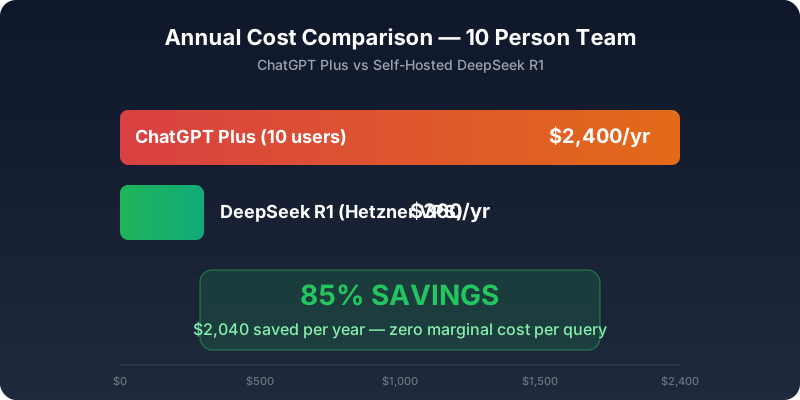
Annual cost comparison — ChatGPT Plus vs Self-Hosted DeepSeek R1 for a 10-person team
Break-even analysis for a 10-person team:
- ChatGPT Plus for 10 users: $200/month = $2,400/year
- Self-hosted DeepSeek R1 on a Hetzner VPS: $30/month = $360/year
- Savings: $2,040/year (85%)
And that's the conservative scenario. If your team uses the API heavily for code generation, document analysis, or automated workflows, savings multiply dramatically. With self-hosting, 10,000 queries cost the same as 10 queries: zero marginal cost.
Privacy: The Elephant in the Server Room
This is where self-hosting delivers its most compelling advantage — and it's not even close.
What Happens with ChatGPT
When you send a prompt to ChatGPT:
- Your data travels over the internet to OpenAI's servers (hosted on Microsoft Azure)
- It's processed, potentially logged, and stored according to OpenAI's data retention policies
- OpenAI's privacy policy allows use of your data for model improvement (unless you opt out via API settings or Enterprise plan)
- You're subject to US jurisdiction, regardless of where you're located
For individuals casually chatting, this is fine. For businesses handling proprietary code, legal documents, patient data, financial records, or trade secrets, it's unacceptable.
What Happens with Self-Hosted DeepSeek R1
Your data never leaves your machine. Period.
- Prompts are processed locally on your CPU/GPU
- No telemetry, no logging to external servers
- Full GDPR/HIPAA compliance by default — data stays in your jurisdiction
- Air-gapped deployment possible for maximum security
- You control retention, encryption, and access policies
For regulated industries (healthcare, finance, legal, government), this isn't a nice-to-have. It's a requirement.
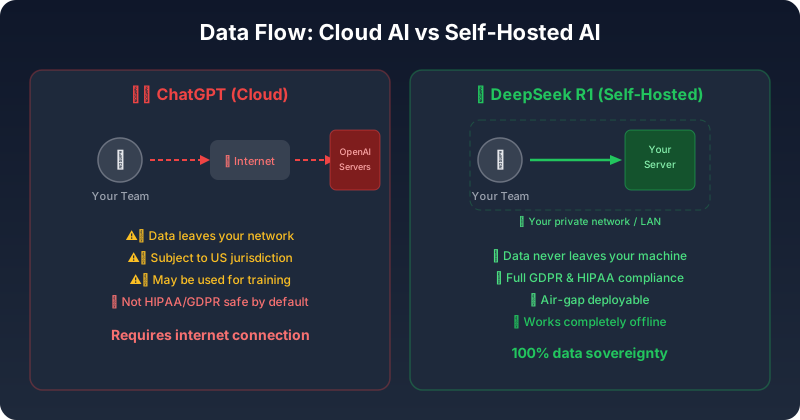
Data flow comparison — Cloud AI vs Self-Hosted AI privacy model
Real-World Privacy Scenarios
| Scenario | ChatGPT | DeepSeek R1 Self-Hosted |
|---|---|---|
| Reviewing proprietary source code | ⚠️ Code sent to OpenAI servers | ✅ Stays on your machine |
| Analyzing patient medical records | ❌ HIPAA compliance risk | ✅ Fully local compliant |
| Summarizing confidential legal briefs | ⚠️ Potential data exposure | ✅ Air-gappable |
| Processing customer PII | ⚠️ Third-party data processor | ✅ You're the sole processor |
| Working on classified projects | ❌ Not possible | ✅ Offline capable |
Performance: How Do They Actually Compare?
Let's be honest about what you get with each option.
Where ChatGPT (GPT-4o / o1) Wins
- ✅Multimodal capabilities: image understanding, DALL-E generation, voice mode
- ✅Browsing and plugins: real-time web access, code execution
- ✅Larger context windows: up to 128K tokens with GPT-4o
- ✅Cutting-edge reasoning: o1 and o1-pro for complex multi-step problems
- ✅Zero setup: works instantly from any browser
Where DeepSeek R1 Wins
- ✅No rate limits: generate as much text as your hardware allows
- ✅Consistent latency: no queue, no "we're experiencing high demand" messages
- ✅Customization: fine-tuning on your domain data for superior specialized performance
- ✅Batch processing: process thousands of documents overnight with no API costs
- ✅Reproducibility: same model, same weights, deterministic outputs
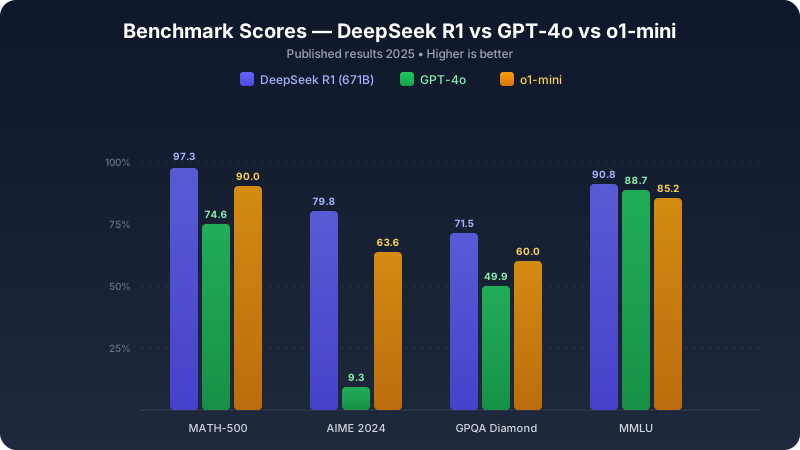
Benchmark scores — DeepSeek R1 vs GPT-4o vs o1-mini across key evaluations
Benchmark Comparison (Published Results 2025)
| Benchmark | DeepSeek R1 (671B) | GPT-4o | o1-mini |
|---|---|---|---|
| MATH-500 | 97.3% | 74.6% | 90.0% |
| AIME 2024 | 79.8% | 9.3% | 63.6% |
| Codeforces Elo | 2,029 | 759 | 1,820 |
| GPQA Diamond | 71.5% | 49.9% | 60.0% |
| MMLU | 90.8% | 88.7% | 85.2% |
| SWE-bench Verified | 49.2% | 38.4% | 41.6% |
Important caveat: These are benchmarks for the full 671B model. If you're running a distilled 7B or 14B variant on modest hardware, expect lower scores. The 70B distillate retains most of the reasoning capability and is the sweet spot for self-hosting.
Quick Setup Guide: DeepSeek R1 + Ollama + Open WebUI
Here's how to go from zero to your own AI assistant in under 10 minutes.
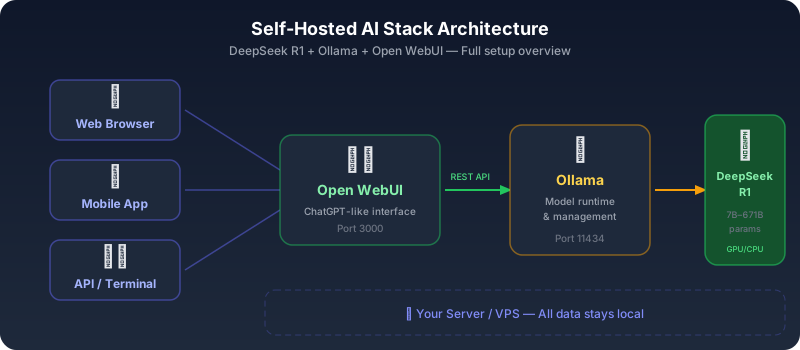
Self-hosted AI stack architecture — DeepSeek R1 + Ollama + Open WebUI
Step 1: Install Ollama
# macOS / Linux
curl -fsSL https://ollama.com/install.sh | sh

# Or on macOS via Homebrew
brew install ollama
Step 2: Download a DeepSeek R1 Model
Choose your model based on your hardware:
# Lightweight (4GB RAM minimum) — good for testing
ollama pull deepseek-r1:8b

# Mid-range (16GB RAM) — solid daily driver
ollama pull deepseek-r1:14b

# Power user (32-64GB RAM) — near-full reasoning capability
ollama pull deepseek-r1:32b

# Beast mode (64GB+ RAM or multi-GPU) — maximum quality
ollama pull deepseek-r1:70b
Step 3: Test in Terminal
ollama run deepseek-r1:14b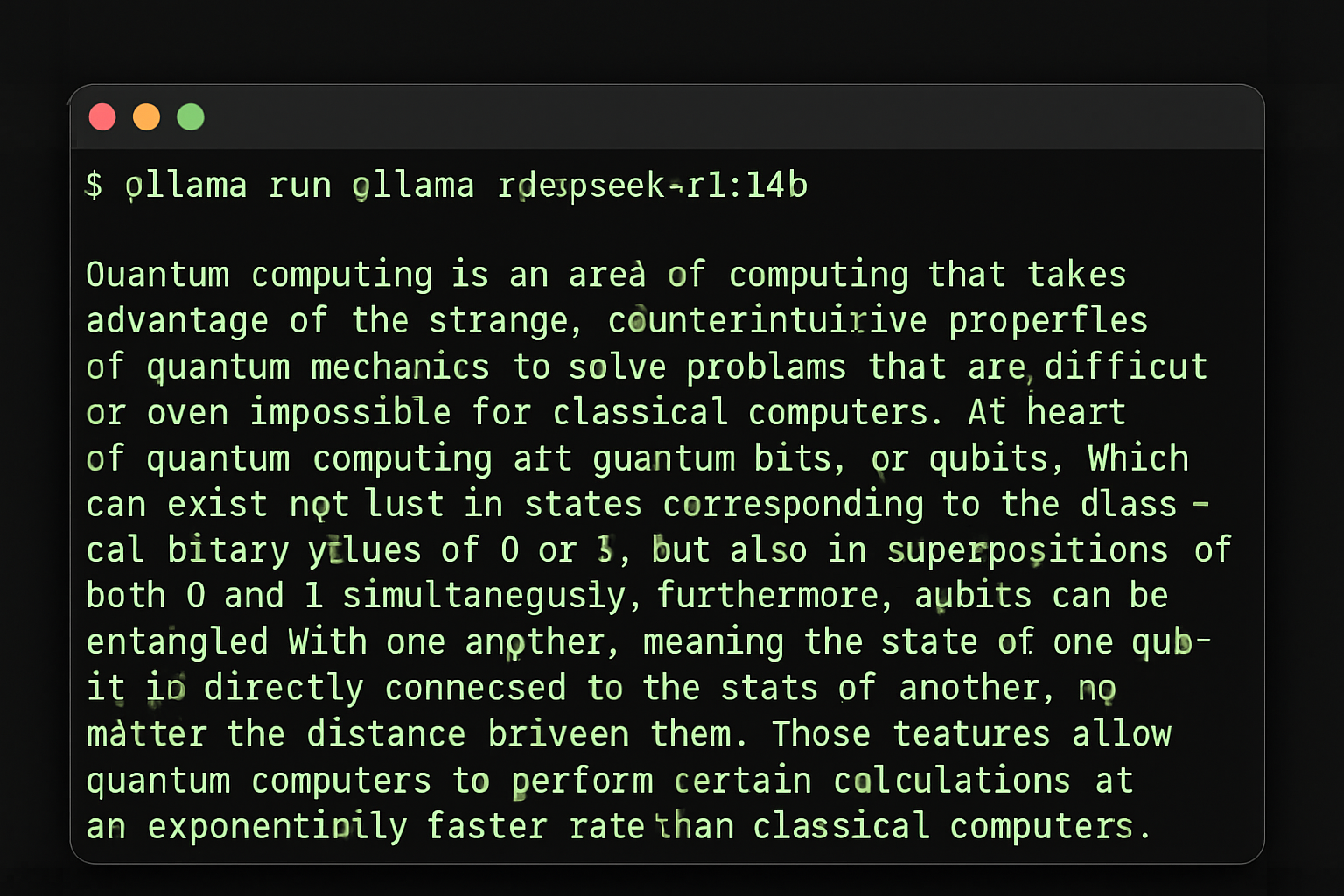
Ollama running DeepSeek R1 — one command to get started
You can start chatting immediately. Type your questions and get responses locally!
Step 4: Add Open WebUI for ChatGPT-like Interface
# Using Docker (recommended)
docker run -d \
  --name open-webui \
  -p 3000:8080 \
  -v open-webui:/app/backend/data \
  --add-host=host.docker.internal:host-gateway \
  -e OLLAMA_BASE_URL=http://host.docker.internal:11434 \
  --restart always \
  ghcr.io/open-webui/open-webui:main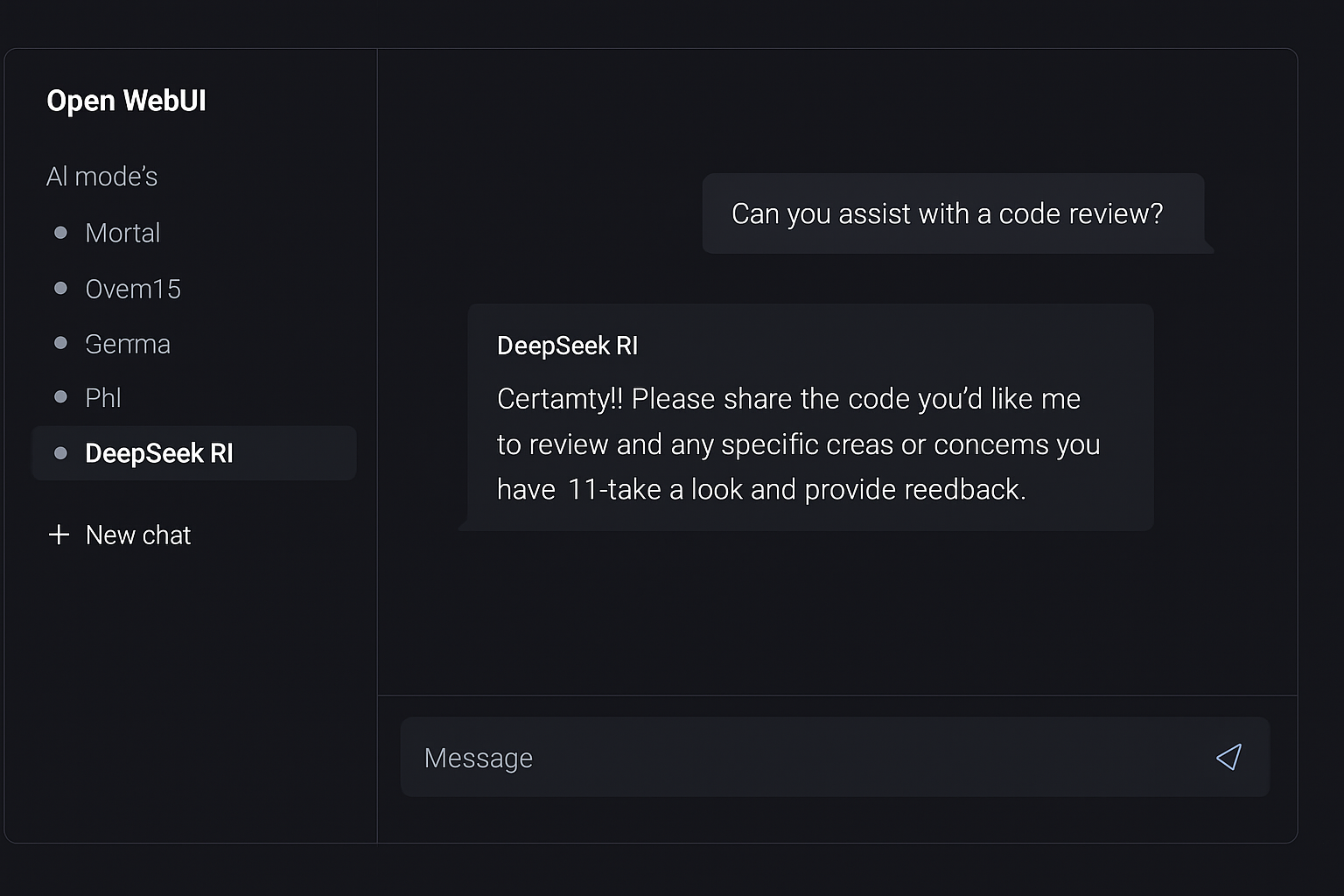
Open WebUI — a ChatGPT-like interface for your local AI
Now open http://localhost:3000 in your browser. Create an account (it's local — the first user becomes admin), select your DeepSeek R1 model, and start chatting.
Step 5: Expose to Your Team (Optional)
If you want to share with colleagues, set up a reverse proxy:
server {
    listen 443 ssl;
    server_name ai.yourcompany.com;

    ssl_certificate /path/to/cert.pem;
    ssl_certificate_key /path/to/key.pem;

    location / {
        proxy_pass http://localhost:3000;
        proxy_set_header Host $host;
        proxy_set_header X-Real-IP $remote_addr;
        proxy_set_header Upgrade $http_upgrade;
        proxy_set_header Connection "upgrade";
    }
}
Your team now has a private, self-hosted AI assistant with a polished web interface. Total setup time: ~10 minutes.
Hardware Requirements by Model Size
Choose the right DeepSeek R1 variant for your hardware:
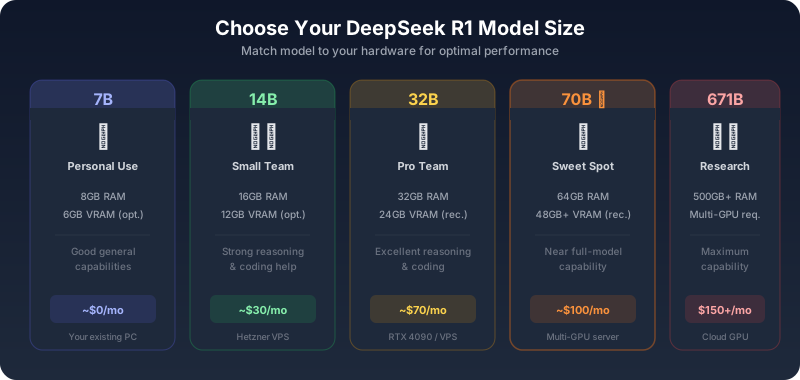
DeepSeek R1 model size tiers — from 7B personal use to 671B research grade
| Model Size | RAM Required | GPU Memory | Performance Level | Best For |
|---|---|---|---|---|
| 1.5B | 2GB | Optional | Basic reasoning, fast responses | IoT devices, testing |
| 7B | 8GB | 6GB VRAM (optional) | Good general capabilities | Personal use, light workloads |
| 14B | 16GB | 12GB VRAM (optional) | Strong reasoning, coding help | Development teams, daily use |
| 32B | 32GB | 24GB VRAM (recommended) | Excellent reasoning and coding | Professional teams, complex tasks |
| 70B | 64GB | 48GB+ VRAM (recommended) | Near full-model capability | Research, enterprise use |
| 671B | 500GB+ | Multi-GPU setup required | Maximum capability | Research institutions only |
VPS Recommendations:
- Hetzner CCX33 (8 vCPU, 32GB RAM): Perfect for 14B model, ~€35/month
- Hetzner CCX53 (16 vCPU, 64GB RAM): Runs 32B model well, ~€70/month
- OVHcloud GPU instances: For GPU-accelerated inference, ~€80-150/month
Use Cases: When to Choose What
Choose ChatGPT When:
- 🔵You need multimodal AI (image analysis, voice, DALL-E)
- 🔵You want zero maintenance and instant access
- 🔵You're a solo user with moderate usage (~$20/month is fine)
- 🔵You need real-time web browsing integrated into responses
- 🔵You need the latest model (OpenAI ships weekly updates)
- 🔵You're building prototypes and want to start immediately
Choose Self-Hosted DeepSeek R1 When:
- 🟢Data privacy is non-negotiable (regulated industries, proprietary code)
- 🟢You have a team of 3+ (costs scale flat, not per-user)
- 🟢You process high volumes (batch analysis, automated pipelines)
- 🟢You need offline capability (air-gapped environments, travel)
- 🟢You want to fine-tune the model on your domain data
- 🟢You're building AI into your product (no API dependency)
- 🟢You want predictable costs (no surprise bills)
- 🟢You need consistent performance (no rate limiting or downtime)
The Hybrid Approach
Many teams in 2026 run both: DeepSeek R1 locally for daily coding assistance, document review, and batch processing — while keeping a ChatGPT Pro subscription for occasional multimodal tasks and access to cutting-edge models. This gives you the best of both worlds while minimizing cloud costs.
Getting Started: Your First 30 Days
Week 1: Test Drive
- Install Ollama and try the 7B model locally
- Set up Open WebUI for your team
- Test on real workflows: code review, document analysis
- Benchmark against your current ChatGPT usage
Week 2: Scale Up
- Upgrade to 14B or 32B model based on results
- Set up dedicated VPS if needed
- Train team members on the interface
- Start migrating regular tasks from ChatGPT
Week 3: Optimize
- Fine-tune prompts for your specific use cases
- Set up automated workflows
- Implement security policies and access controls
- Consider specialized fine-tuning for domain-specific tasks
Week 4: Evaluate
- Calculate actual cost savings
- Measure productivity improvements
- Assess data privacy benefits
- Plan for full migration or hybrid approach
The Big Picture: Why Self-Hosting AI Matters
The shift toward self-hosted AI isn't just about saving money. It's about sovereignty.
When you depend on a cloud AI provider, you're subject to:
- Price changes — OpenAI has raised prices before, and will again
- Policy changes — Terms of service can change overnight
- Censorship decisions — What the model will discuss and what it won't
- Availability — Outages happen, rate limits get tightened
- Geopolitical risk — Access can be restricted by region
- Model updates — Your favorite model version might be retired
With self-hosted models, you own your AI stack. You choose which model to run, how it behaves, what data it sees, and when to upgrade. That's not just a technical advantage — it's a strategic one.
Security Considerations
Self-hosting AI comes with security responsibilities:
Best Practices
- Keep systems updated — Ollama, Docker, host OS patches
- Network isolation — Use VPNs or private networks for team access
- Access controls — Implement authentication and user management
- Monitoring — Log usage and monitor for anomalies
- Backups — Regular backups of configurations and chat histories
Compliance Frameworks
- GDPR compliance — Data stays in your jurisdiction by default
- HIPAA readiness — No third-party data processing
- SOC 2 — You control all security aspects
- ISO 27001 — Easier compliance with self-managed systems
Conclusion: The Smart Move in 2026
A year ago, self-hosting AI was an experiment for hobbyists. Today, it's a production-ready strategy used by startups, enterprises, and independent developers worldwide.
DeepSeek R1 offers reasoning capabilities that compete with — and in some benchmarks exceed — ChatGPT. Ollama makes deployment trivial. Open WebUI gives you a polished interface. And you keep every byte of data under your control.
The math is simple:
- 10-person team on ChatGPT Plus: $2,400/year
- 10-person team on self-hosted DeepSeek R1: $360/year
- Annual savings: $2,040 — plus complete data sovereignty
ChatGPT remains an excellent product. But when you can match its core capabilities at a fraction of the cost while keeping your data private, the smart move is clear.
The self-hosting revolution isn't coming — it's here. The question is: will your team lead the charge, or watch from the sidelines?
Ready to explore more self-hosted AI tools? Browse our curated directory of self-hostable applications at hostly.sh — from AI assistants to automation platforms, we help you find the best open-source software to run on your own infrastructure.
Need a powerful VPS for AI workloads? Check out our optimized hosting plans specifically designed for machine learning and AI applications. Get started with DeepSeek R1 on a production-ready server in minutes.
Found this comparison helpful? Check out our other guides on self-hosted alternatives to popular SaaS tools.